Service usage
Displaying service usage
-
Access Administration.
Accessing Administration -
Click Services usage.
Users
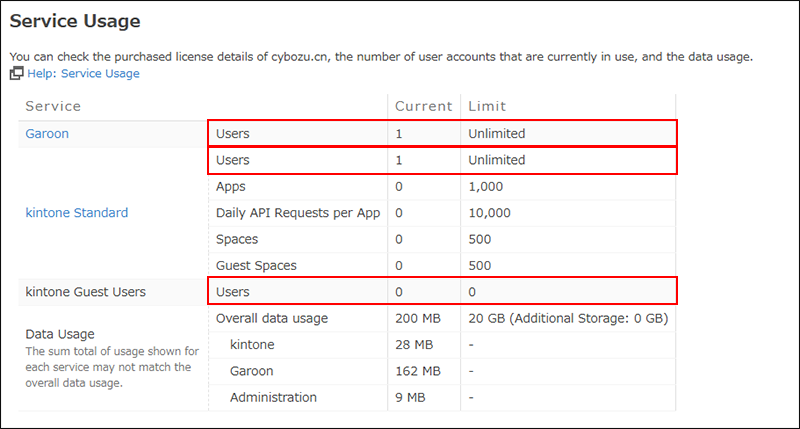
- Current column
- The number of users set for each service in Administration is displayed.
- Limit column
- The number of user licenses you have purchased is displayed.
Data usage
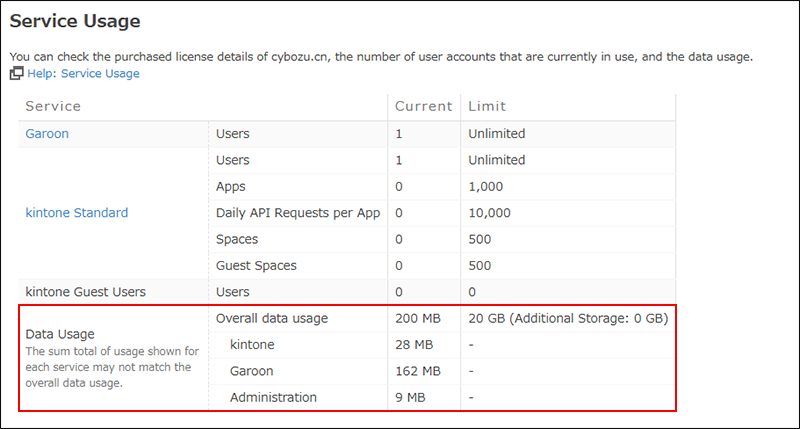
The data usage amounts displayed on the Service usage screen in Administration are totals of the data being used in the attachment, audit log, and database storage areas.
- Current column
- You can view data usage both for all services and for each individual service.
The sum of the data usage for each service may not equal the total data usage.
It may take up to 9 hours for the actual data usage to be reflected on the screen. - Limit column
- You can view the data capacity available for all your services.
For details on how to calculate data capacity, refer to the following page:
Data capacity
Warning of data usage limit exceeded
When the amount of data currently used exceeds the limit, a warning message is displayed on the Administration screen.
For details on how to resolve the issue by reducing the data usage, refer to the following pages:
- kintone: What can I do to reduce the disk usage?
- Garoon: To Reduce Disk Usage